
If you work with many git repositories, you know the pain - repos scattered across random directories, no consistent structure, and find becoming your best friend just to locate a project.
git-get solves this. Inspired by Go’s go get, it organizes repositories into a predictable directory tree based on their URL structure.
Install#
brew install git-getConfigure#
Configuration lives in your git config - no extra dotfiles needed:
git config --global gitget.root ~/git-repos  # or ~/src
git config --global gitget.skip-host true
git config --global gitget.scheme ssh
skip-host keeps paths shorter by omitting the hostname (e.g. ~/git-repos/owner/repo instead of ~/git-repos/github.com/owner/repo).
Since it integrates directly with git, you get a new git get subcommand - no separate binary to remember.
Usage#
Clone any repo with a short reference:
git get facebook/react      # → ~/git-repos/facebook/react
git get golang/go           # → ~/git-repos/golang/go
List all your repos with their branch and status:
git list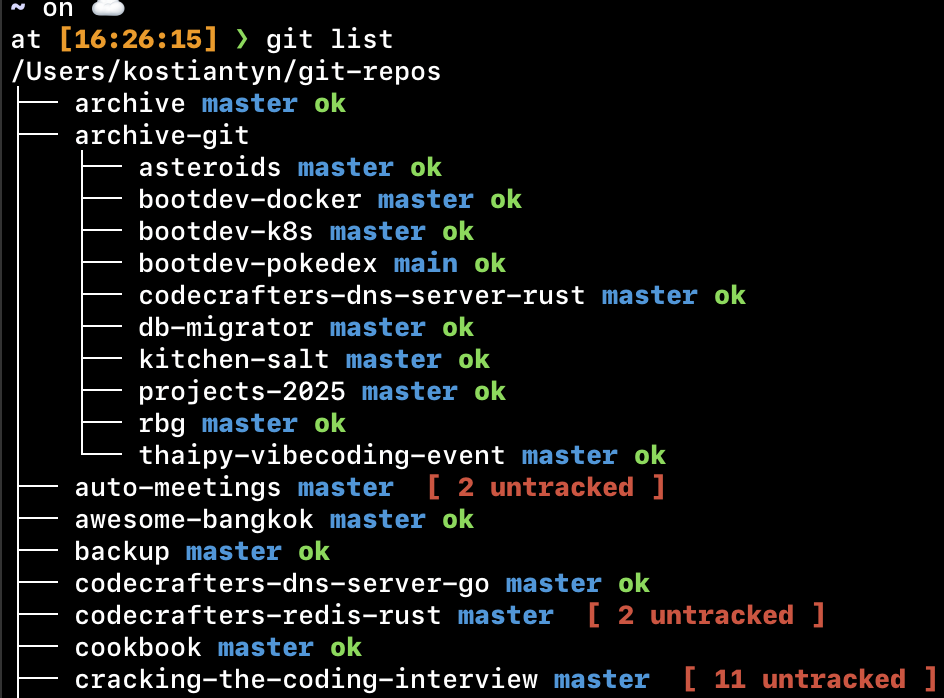
git list shows a tree view of all managed repositories, their current branch, and working directory status (untracked files, uncommitted changes) at a glance.
Quirk: git-extras conflict#
If you have git-extras installed, it also ships a git-get command. Fix the conflict with:
brew link --overwrite git-getThis only overwrites the git-get symlink; other git-extras commands stay intact.